Do Professional Photography Prints Really Upgrade a Home Office?
Editorial Team · October 25, 2026
Last Updated: October 25, 2026
Quick Summary
Professional photography prints upgrade a home office by giving your eye a place to rest between video calls and spreadsheet rows, making a blank wall read as intentional rather than temporary. Size the print to fill roughly two-thirds to three-quarters of the width of the furniture beneath it, centered at seated eye level.
- One large statement print beats four small ones in most home offices, keeping the wall quiet.
- Center a print 48 to 57 inches from the floor for an average adult at a desk.
- A desk 60 inches wide pairs with a print around 40 to 45 inches wide.
- Keep the print's bottom edge at least 8 to 10 inches above the monitor's top edge.
- Hang framed pieces with two hooks a few inches apart so the frame stays level.
Table of Contents
- Why Professional Photography Prints Belong in a Home Office
- Home Office Wall Art Ideas That Do More Than Fill Space
- Photo Print Sizes for Wall Art: Matching Format to Wall Space
- Gallery Wall Layout Ideas for a Working Room
- How to Choose Wall Art for Home Office Spaces
- Paper, Finish, and Framing: What Keeps a Print Looking Right
- Budget, Care, and Longevity: The Costs Beyond the Print
- Pick Your Print and Plan the Wall
- Frequently Asked Questions
Why Professional Photography Prints Belong in a Home Office
The U.S. photofinishing industry generates $1.4 billion across 9,156 businesses, according to IBISWorld's Photofinishing in the US Industry Analysis, which tells you something useful: people still want physical prints, even in a screen-saturated world. At Brian Farber Photography, we sell professional photography prints for home office walls, and the difference a single framed landscape makes to a room is not subtle. It changes how the space feels the moment you sit down.
What a Print Changes About a Workspace
A photograph on the wall gives your eye somewhere to rest between video calls and spreadsheet rows. Landscape photography, in particular, pulls attention outward and downward, which is exactly the opposite of what a monitor does all day. That visual break is the whole point. A blank wall behind a desk reads as temporary. A framed print reads as intentional.
Home Office Wall Art Ideas That Do More Than Fill Space
Start with what the room already does. A workspace facing a wall of monitors needs calm above the desk, not more visual noise.
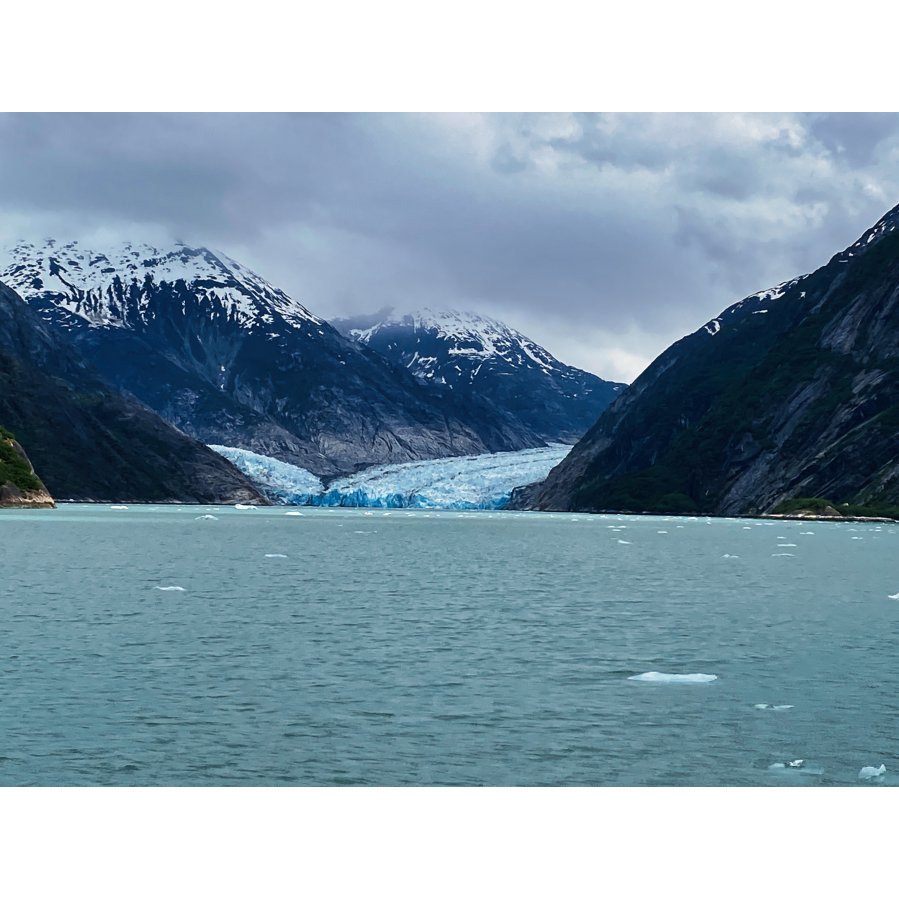
Calming landscape photography suits rooms where you think. Abstract photography works better in spaces where you brainstorm, because there's nothing literal to decode. Architectural photography adds structure, with geometric lines that echo shelving and desk edges.
Single Statement Print vs. Grouped Wall
One large print beats four small ones in most home offices. A single statement piece anchors the room and keeps the wall quiet. Grouped walls work when the space is wide and the desk doesn't face them directly. If you sit facing the wall all day, one print is plenty.
Photo Print Sizes for Wall Art: Matching Format to Wall Space
Most sizing advice stops at "make it big enough." For a home office, the useful rule is geometric: the print should fill roughly two-thirds to three-quarters of the width of the furniture beneath it, and its center should sit at seated eye level, typically 48 to 57 inches from the floor for an average adult at a desk. A desk 60 inches wide pairs with a print around 40 to 45 inches wide. Too small and the wall looks unfinished; too large and the room feels compressed.
| Wall Situation | Suggested Print Width | Center Height (seated eye level) | Format |
|---|---|---|---|
| Above a narrow desk | 16-24 inches | 48-52 inches | Single framed print |
| Behind a standard desk | 30-40 inches | 50-55 inches | Single statement print |
| Wide empty wall | 45-60 inches | 52-57 inches | Triptych or paired prints |
| Small alcove or shelf | 8-12 inches | Desk height plus 12-18 inches | Matted desk print |
| Wall behind a video-call camera | 24-36 inches | 54-58 inches | Single print, matte finish |
Sizing Around Monitors, Shelves, and Video-Call Frames
Measure the wall, not the image. A print hung behind a monitor competes with the screen for attention; keep the bottom edge at least 8 to 10 inches above the monitor's top edge so the two don't crowd each other.
For a triptych, treat the three panels as one unit: total width follows the two-thirds rule, and the gaps between panels should be 1.5 to 3 inches so the group reads as a single composition rather than three unrelated pictures.
Custom Sizing vs. Standard Frames
Standard frames push you toward sizes that don't fit your wall, and the mismatch is most visible in narrow offices and above built-in shelving. Custom sizing lets you match the print to the actual opening, for example, a 27-inch-wide alcove that fits nothing off the shelf. Ask for the finished outside dimensions of the frame, not just the image size, because a 2-inch mat and a 1-inch frame can add 6 inches to the total width.
Gallery Wall Layout Ideas for a Working Room
Gallery wall layout ideas fail most often because people space frames evenly across the whole wall instead of grouping them. Cluster the frames tightly, leaving 2 to 3 inches between edges, and center the group at eye level when seated. A grid of same-size frames reads orderly and suits analytical work. A looser arrangement of mixed sizes feels creative but demands more wall space to avoid looking cluttered.
How to Choose Wall Art for Home Office Spaces
Knowing how to choose wall art for home office use comes down to three filters: mood, color, and what the wall faces. Decide the mood first. A room where you handle focused work benefits from blue tones and green tones, which read cool and steady. A room where you take calls and host video meetings can handle warmer gold tones.
Lighting, Glare, and Screen-Facing Placement
Watch out: hanging a glossy print directly opposite a window turns it into a mirror by mid-afternoon, and the glare lands in your peripheral vision all day. Place prints on walls perpendicular to windows, or choose a matte finish that scatters light instead of reflecting it. If your desk faces the print, keep the glass finish subdued. If the print sits behind you on video calls, a slightly brighter image reads better on camera.
Paper, Finish, and Framing: What Keeps a Print Looking Right
Archival quality starts with the paper and the ink, not the frame. Archival pigment inks paired with a quality photo paper resist fading far better than standard dye prints. Luster paper sits between glossy and matte, holding rich color reproduction without the mirror effect of a glossy finish.
Framing choices matter just as much. Matted prints with a wide mat look more gallery-like and keep the image off the glass. Canvas prints need no glass at all, which removes glare entirely. Metal prints hold fine detail and resist moisture.
Budget, Care, and Longevity: The Costs Beyond the Print
The print is rarely the whole cost, and the gap between a print and a finished, hung piece is where budgets quietly break. A useful way to plan is to separate the purchase into four line items and ask any lab or photographer to quote them separately before you order:
- Print, paper type and size drive this line. Larger sizes and premium papers (metallic, cotton rag) cost more per square inch than standard luster.
- Framing and matting, often the largest line for paper prints. A wide mat and a solid wood frame can exceed the print cost itself; canvas and metal formats skip glass and mat entirely.
- Glazing, standard glass, acrylic, and anti-glare or UV-filtering options sit at different price points, and the upgrade is usually worth it in a sunlit room.
- Shipping, oversized framed pieces ship freight, not parcel, and that changes the total. Ask for the delivered price, not the product price.
Format Trade-Offs That Affect Total Cost
| Format | Glass Needed? | Glare Risk | Best For | Longevity Notes |
|---|---|---|---|---|
| Framed paper print | Yes | Moderate to high (glossy) | Traditional offices, matted gallery look | Archival pigment inks on quality paper resist fading well when out of direct sun |
| Canvas | No | None | Large walls, casual rooms | Stretched canvas can sag over years; keep away from heat |
| Metal | No | Low to moderate | Modern offices, high-detail images | Resists moisture; surface can show fingerprints |
| Matted desk print | Optional | Low | Shelves, small alcoves | Keep off the glass with a mat to avoid sticking |
Installation, Cleaning, and Sun Exposure
Hang framed pieces with two hooks set a few inches apart rather than one center hook, a single hook lets the frame pivot and drift out of level. Use a level and check the bottom edge against the desk line. For heavy frames, anchor into a stud or use appropriate wall anchors rated for the weight; drywall alone won't hold a large framed piece safely.
Clean glass and acrylic with a dry microfiber cloth or a spray applied to the cloth, never directly to the surface, and avoid paper towels that can scratch acrylic. Dust canvas with a soft brush. Keep every format out of direct sun and away from heat sources like radiators and space heaters; UV-filtering glazing slows fading but doesn't stop it.
Pick Your Print and Plan the Wall
The hard part isn't buying a print. It's committing to a wall that currently holds nothing but paint and a power strip. Start with one image you'd happily look at for a thousand meetings, size it to your desk, and hang it where the light behaves. Brian Farber Photography offers professional photography prints for home office walls drawn from Japan, Alaska, Colorado, Michigan, and Disney theme park collections, with custom sizing and finish options to match your room.
Frequently Asked Questions
How do I choose photography prints for a home office?
Start with the wall you see most often while working, then pick a subject that fits the mood you want: landscape photography for calm, abstract photography for energy, or architectural photography for structure. Match the print size to the wall, not the other way around, and check how the frame and finish will look under your office lighting. Order a small test print first if you are unsure about color.
What size photo print works best above a desk?
A print hung above a desk usually looks best when it spans roughly half to two-thirds of the desk's width, so a 16x20-inch or 18x24-inch print suits many setups. For a narrow wall or a shelf, an 8x10-inch or 11x14-inch print is enough. Measure the gap between the desk and the ceiling before ordering, and leave at least 6 to 8 inches of clear wall above the desk.
How should I arrange multiple photo prints on an office wall?
Lay the frames on the floor first and photograph the arrangement before hanging anything. A grid of same-size prints reads as orderly in a work setting, while a centered large print with two smaller ones works on a narrow wall. Keep 2 to 3 inches between frames, align the outer edges, and hang the center of the group at eye level when you are seated.
Are professional photography prints archival quality?
Archival quality depends on the paper, the inks, and how the print is displayed. Professional labs use archival pigment inks and photo paper rated for long life, but direct sunlight and damp walls shorten that life quickly. Ask which paper and ink a lab uses, keep prints out of direct sun, and use a frame with a mat so the print does not touch the glass.
How do I choose a frame and finish for a professional photo print?
Match the frame to the room rather than the photo: thin black or natural wood frames suit most home offices, while metal prints work without a frame at all. Luster paper hides fingerprints and glare better than glossy finish, and photo matte suits rooms with strong window light. Add a mat for a gallery look, and pick glass finishes that cut reflection if the print faces a window.
A blank wall behind a desk is a missed opportunity, and fixing it takes one afternoon. Brian Farber Photography sells archival prints from Japan, Alaska, Colorado, Michigan, and Disney collections, with custom sizing and multiple finish options. Get started with Brian Farber Photography and give your workspace a wall worth looking at.
